
7 File plan
The File plan is the central element of the ECM smart connect. Knowing its structure, setting it up correctly and understanding how it works are of fundamental importance for the use of the system in a company.
A File plan is the regulation of the systematic order of all documents of an administration, a company or another organization. The aim of the File plan is the clear, comprehensible and economic order of the documents.
In ECM smart connect, the file plan is closely based on the business processes that Dynamics 365 Business Central are predetermined. The results of a business process are defined as a business object. For example, the business object offer arises as a result of the business process of the offer entry. Or the customer invoice business object is created through the posting of an outgoing invoice business process.
One or more documents can be assigned to each business object. The customer invoice business object is normally only assigned a printout of the customer invoice as a receipt. The offer business object, on the other hand, can have severalGet printouts assigned as versions.
There are direct relationships between the business objects that result from the business process of Dynamics 365 Business Central . By creating an order from an offer, a relationship is created between the two business objects, offer and order. This relationship is established via a reference field. The order contains the number of the original offer. When the order is delivered, the delivery note business object is created; the invoice business object is created when the order is posted. The relationship between the business objects is established via the order number field.
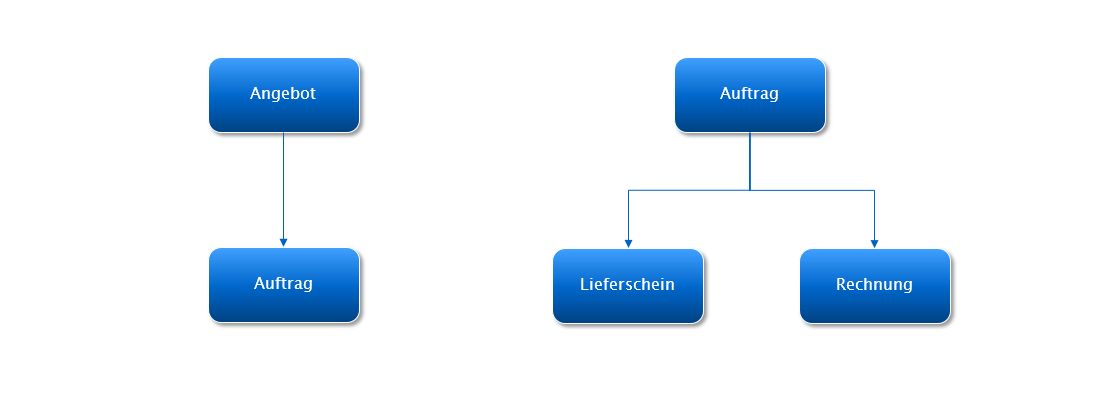
In ECM smart connect the direct relationships between the business objects can be freely defined. However, an initial definition is supplied and can be installed at the push of a button.
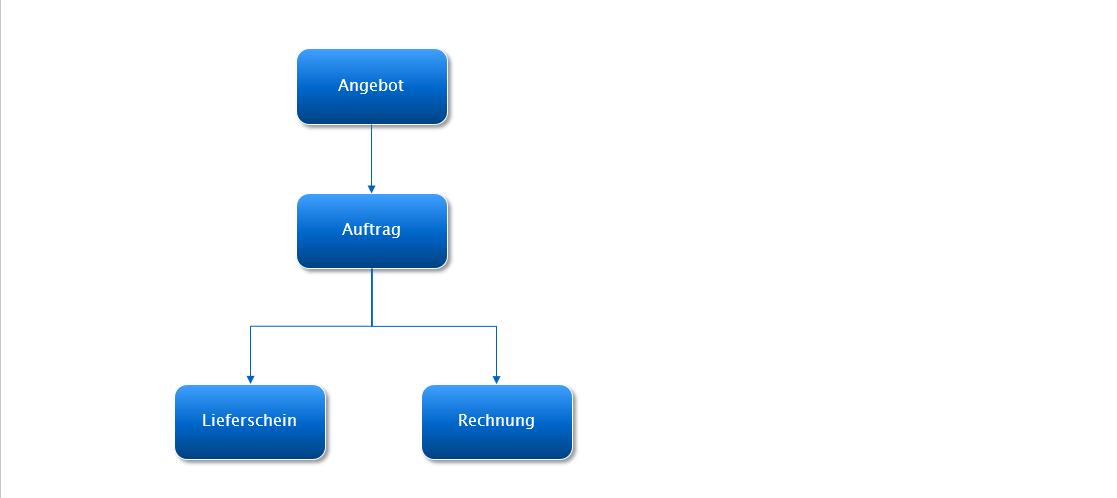
A multi-level structure is created by combining the business objects and their relationships. This is the File plan.
This File plan allows related business processes to be displayed and analyzed over several work steps. In this example, it is very easy to determine which invoice is based on which offer.
A business object in the File plan remains, unlike in the standard of Dynamics 365 Business Central, permanently. While the offer data is deleted in Dynamics 365 Business Central by the business process creating an order, the business object Offer remains in the File plan.
7.1 File plan flowchart
7.2 File plan description
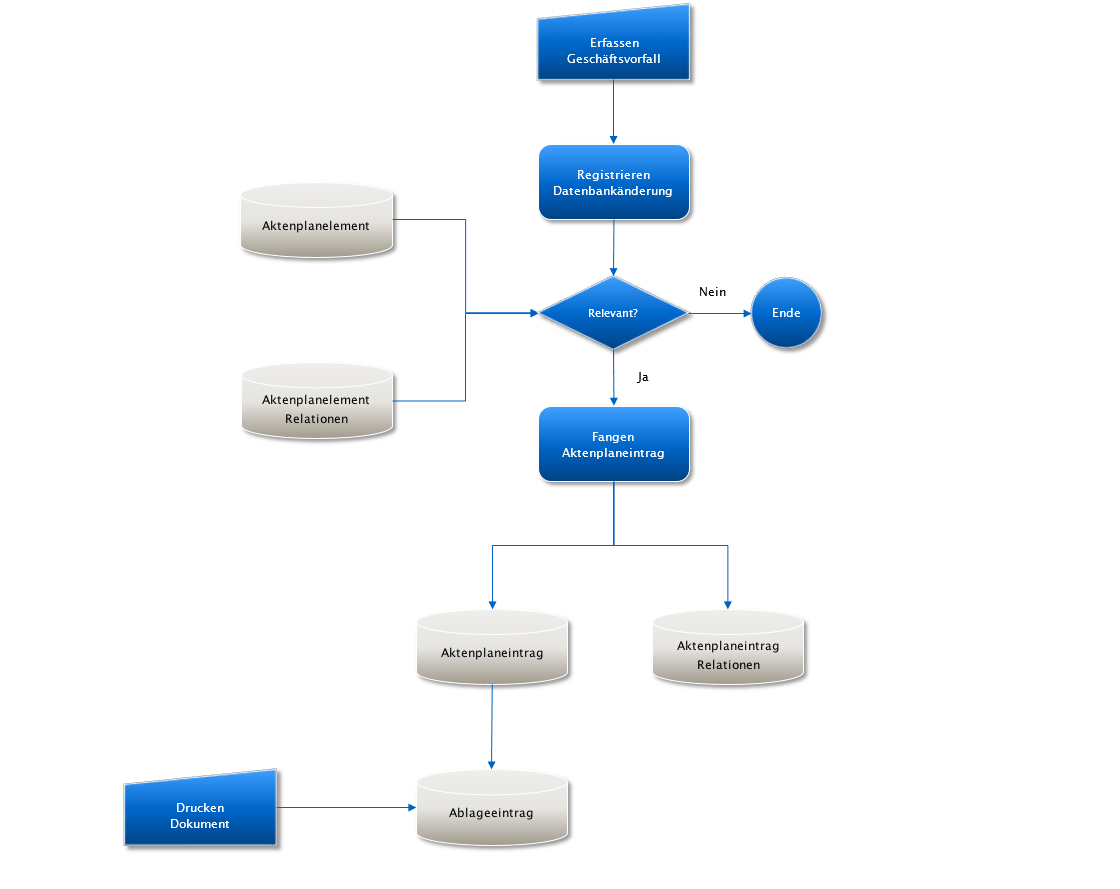
With the processing of a business object, e.g. a customer order, ECM smart connect builds the File plan in parallel. If a sales order Dynamics 365 Business Central is created, an entry is made in the File plan that refers to this sales order.
To make this entry, the program ECM; smart connect will first recognize relevant changes in the database. In general, database changes are registered via the global trigger management of Dynamics 365 Business Central . A subscriber program of the File plan module is linked to the global trigger management and thus reacts to database changes. The subscriber program recognizes what a relevant database change is based on the definitions in the ECM smart connect setup data.
In this facility data, the elements of the file plan are described and the relationships that exist between the elements n . Relationships between the elements are established via database fields. The database fields themselves can be freely determined.
If a relevant database change is recognized, the subscriber program creates an entry in the File plan according to the definition in the facility data. This File plan entry contains the information on the business object to which the File plan entry refers as well as on the relationships that are upstream or downstream of the business object. For example, when processing a customer order, the File plan entry for the customer order is made, as well as the references to the upstream offer and the downstream delivery notes.
The File plan is built up dynamically while a business transaction is being processed and can be displayed on the screen. In the structure view of the File plan, the connected business objects can be identified and viewed immediately.
If documents are printed that refer to the File plan entry, these printouts are saved in ECM smart connect and attached to the File plan entry. From there they can be called up, displayed or reprinted.
Printouts of receipts require a lot of storage space in a database. So that the Dynamics 365 Business Central database is not overloaded by the permanent storage of the printouts, ECM smart connect provides for these printouts to be periodically transferred to a downstream ECM system and archived there.
After successful archiving, the saved printouts are deleted from ECM smart connect in order to relieve the Dynamics 365 Business Central database again. The File plan entry itself is retained. The display management of ECM smart connect then ensures that the archived receipt can be called up, displayed or reprinted from the downstream ECM system from this point in time.